
JavaScript Arrays 101
Say goodbye to endless variables and hello to clean, organized data collections.
Have you ever tried to keep track of a list of items in your code? Let’s say you’re building a simple application to track your daily tasks or manage a list of your favorite fruits.
If you try to store these values individually, your code might look something like this:
let fruit1 = "Apple";
let fruit2 = "Banana";
let fruit3 = "Mango";
let fruit4 = "Orange";
Imagine if you had 100 fruits! Creating a separate variable for every single item quickly becomes messy, hard to manage, and nearly impossible to scale.
This is where arrays come to the rescue.
What Are Arrays and Why Do We Need Them?
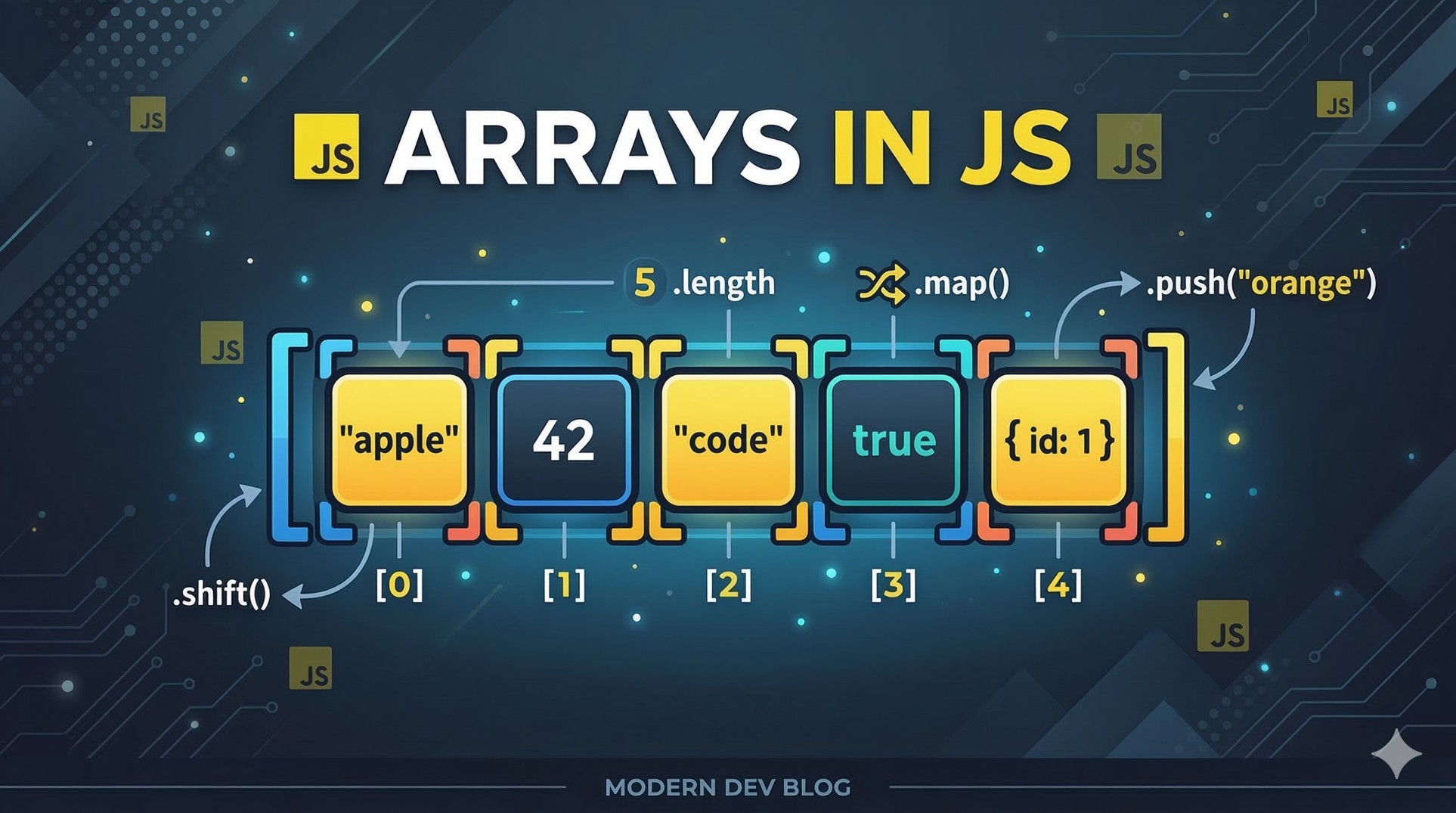
An array is a single variable that can store a collection of values in a specific order. Think of an array like a neatly organized pill organizer or a bookshelf. Instead of throwing all your books into a pile (or creating 100 individual variables), you line them up sequentially on one shelf where you can easily find exactly what you need.
Arrays allow us to group related data together, keeping our code clean and giving us powerful ways to interact with that data all at once.
How to Create an Array
Creating an array in JavaScript is straightforward. You just use square brackets [] and separate your items with commas.
const fruits = ["Apple", "Banana", "Mango", "Orange"];
Just like that, we’ve replaced four separate variables with one clean, organized array.
Accessing Elements Using the Index
Every item inside an array has a specific numbered position called an index.
Here is the most important rule to remember about arrays in JavaScript (and most programming languages): indexing starts at 0, not 1. * The first item is at index 0
The second item is at index
1The third item is at index
2
To access an element, you write the name of the array followed by square brackets containing the index number.
const fruits = ["Apple", "Banana", "Mango", "Orange"];

console.log(fruits[0]); // Output: "Apple"
console.log(fruits[2]); // Output: "Mango"
Updating Elements
Arrays are dynamic, meaning you can change the data inside them after they are created. You can update an element by accessing its index and assigning a new value to it, exactly like you would with a standard variable.
Let's say we want to replace "Banana" with "Strawberry":
const fruits = ["Apple", "Banana", "Mango", "Orange"];

// "Banana" is at index 1
fruits[1] = "Strawberry";

console.log(fruits);
// Output: ["Apple", "Strawberry", "Mango", "Orange"]
The Array Length Property
Often, you need to know exactly how many items are inside your array. JavaScript provides a built-in property called .length that does the counting for you.
Note: While indexes start at 0, the length property counts items normally, starting from 1.
const fruits = ["Apple", "Banana", "Mango", "Orange"];

console.log(fruits.length); // Output: 4
Basic Looping Over Arrays
The real power of an array is the ability to run code for every single item inside it without repeating yourself. We can use a basic for loop alongside the .length property to iterate through our collection.
Here is how you can print every fruit in the list:
const fruits = ["Apple", "Banana", "Mango", "Orange"];

for (let i = 0; i < fruits.length; i++) {
  console.log("I love eating " + fruits[i]);
}

// Output:
// I love eating Apple
// I love eating Banana
// I love eating Mango
// I love eating Orange
In this loop, the variable i starts at 0 and increases by 1 each loop, stopping right before it hits the total length of the array. This perfectly matches our 0-based index system!
Your Turn: Try This Assignment!
Ready to write some code yourself? Open up your code editor or console and try this quick assignment to test your knowledge:
Create an array containing 5 of your favorite movies.
Print the very first and the very last element to the console.
Change the value of the 3rd movie in your list to something else, then print the updated array.
Write a basic
forloop to go through the array and print all the movie names one by one.
Drop your code in the comments below if you want feedback.