Function Declaration vs Function Expression: What’s the Difference?
Building a solid JavaScript foundation for your web development journey.
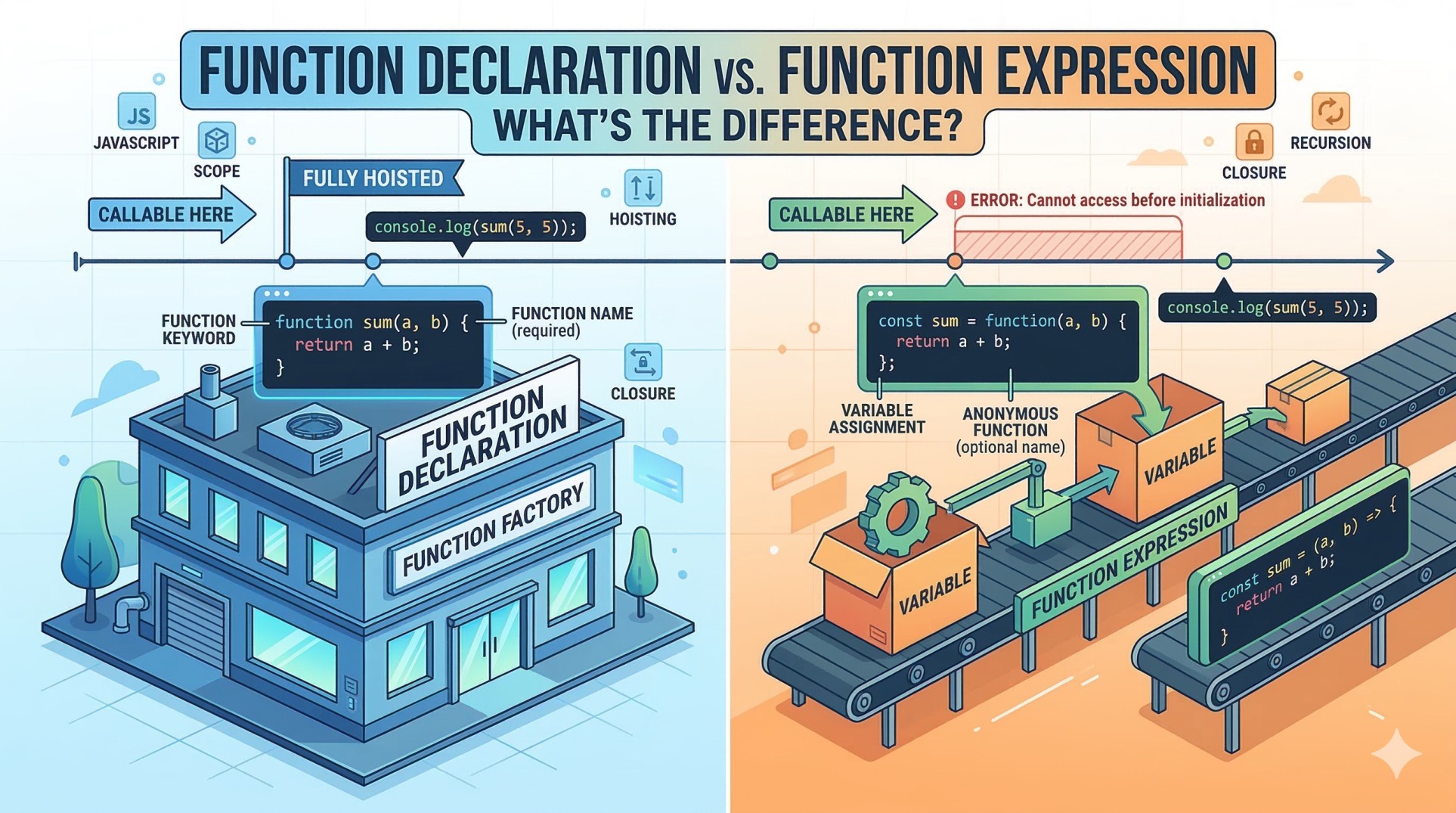
If you are diving deep into JavaScript to eventually master libraries like React, understanding how functions work under the hood is an absolute must. Functions are the building blocks of JavaScript, but there is more than one way to write them.
Today, we are going to break down the two most common ways to create functions: Function Declarations and Function Expressions. We'll look at their syntax, explore a quirky JavaScript behavior called "hoisting," and figure out when you should use each one.
What Are Functions and Why Do We Need Them?
Imagine you are building a house. Instead of building every single door from scratch using raw wood and nails right at the doorframe, you build a door-making machine. You feed the machine wood, and it gives you a finished door anywhere you need it.
In programming, a function is exactly that: a reusable block of code designed to perform a specific task. We need them because they keep our code clean, organized, and DRY (Don't Repeat Yourself). Instead of writing the same logic over and over, you write it once inside a function and call it whenever you need it.
Let's look at the two main ways to build these "machines" in JavaScript.
1. Function Declaration Syntax
A function declaration is the standard, traditional way of writing a function. You start with the function keyword, followed by the name you want to give it, parentheses (), and curly braces {} holding your logic.
Here is a simple example that adds two numbers:
function addNumbers(a, b) {
  return a + b;
}

console.log(addNumbers(5, 10)); // Output: 15
It is straightforward and clearly announces, "Hey, I am creating a function named addNumbers!"
2. Function Expression Syntax
A function expression takes a different approach. Instead of declaring a standalone function, you create a function and store it inside a variable.
Here is the exact same addition logic, written as an expression:
const addNumbers = function(a, b) {
  return a + b;
};

console.log(addNumbers(5, 10)); // Output: 15
Notice that the function itself doesn't have a name between the function keyword and the parentheses (this is often called an anonymous function). The function is simply treated as a value that gets assigned to the addNumbers variable.
The Key Difference: A High-Level Look at Hoisting
At first glance, declarations and expressions look like two different flavors of the exact same thing. But there is a crucial difference in how JavaScript handles them behind the scenes, and it comes down to a concept called hoisting.
Hoisting is JavaScript's default behavior of moving declarations to the top of their scope before the code actually runs.
Function Declarations are fully hoisted. You can successfully call the function before you even define it in your code. JavaScript reads the whole file, pulls the declaration to the top, and then executes your code.
Function Expressions are NOT hoisted. (More accurately, the variable might be hoisted, but its assignment as a function is not). If you try to call a function expression before you define it, JavaScript will throw an error.
Let's see this in action.
The Declaration Way (Works!)
// Calling the function before defining it
console.log(greet("Divyanshu")); // Output: "Hello, Divyanshu!"

function greet(name) {
  return `Hello, ${name}!`;
}
The Expression Way (Breaks!)
// Calling the function before defining it
console.log(greet("Divyanshu")); // ReferenceError: Cannot access 'greet' before initialization

const greet = function(name) {
  return `Hello, ${name}!`;
};
Side-by-Side Comparison
Feature | Function Declaration | Function Expression |
Syntax |
|
|
Hoisting | Yes (can call before defining) | No (must define before calling) |
Use Case | General, globally accessible helper functions | Passing functions as arguments (callbacks), strict top-to-bottom flow |
When to Use Each Type
Use Function Declarations when you want to create utility or helper functions that you want to be available anywhere in your file, regardless of where they are written. It can make your code easier to read if you want to put your main logic at the top of the file and hide the helper functions at the bottom.
Use Function Expressions when you want to enforce a strict, predictable top-to-bottom execution flow. Because they aren't hoisted, you are forced to define your functions before you use them, which can prevent confusing bugs. They are also heavily used in modern JavaScript frameworks and when writing callbacks.
Practice Assignment
The best way to solidify this concept is to write it out yourself! Open up your code editor and try this:
Write a Function Declaration that takes two numbers and multiplies them.
Write the exact same logic using a Function Expression.
Call both functions with some test numbers and
console.logthe results to make sure they work.The Hoisting Test: Try calling both functions above the lines where you defined them. Observe the behavior and the error messages in your console.